
- 3-day historical monitoring: AppControl logs second-by-second data for up to three days, allowing users to track past performance issues.
- Real-time and historical resource monitoring: Combines immediate insights with detailed past activity, a feature sought by power users.
- No user registration required: The software collects 'little to no data by default' and operates entirely locally.
Experts view AppControl as a significant advancement in system utilities, bridging the gap between technical depth and user accessibility by providing clear, actionable insights into PC performance.
AppControl Launches a Time Machine for Your PC's Performance
AUSTIN, Texas – February 10, 2026
For countless Windows users, a suddenly whirring fan or a grinding slowdown is a familiar mystery. By the time Task Manager is open, the resource-hogging culprit has often vanished, leaving behind only frustration and a question with no answer. Today, a new utility named AppControl launches with a bold promise: to turn that mystery into a clear, visual history, empowering everyday users to finally understand their own machines.
Demystifying the 'Why' Behind PC Slowdowns
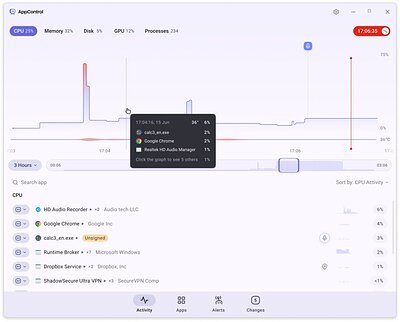
Unlike traditional system tools that offer only a fleeting, real-time snapshot of system activity, AppControl functions like a flight recorder for your computer. It continuously logs second-by-second data for up to three days, creating an interactive, scrollable timeline for every key component: CPU, GPU, memory, disk usage, and temperature. This fundamentally changes the troubleshooting process from a guessing game into a factual investigation.
If your PC became sluggish yesterday afternoon, you can simply scroll back to that time on the graph, hover over the performance spike, and AppControl will instantly identify the exact application or background process responsible. The idea was born from a universal frustration that many PC users share. "There was no way to see what had just happened," said Jon Hundley, Co-Founder and CEO of AppControl, in the company's announcement. "When I searched for a historical version of Task Manager, all I found were memes from other people who were clearly dealing with the same problem."
This approach is designed to empower those without a degree in computer science to take control of the hardware they paid for. It shifts the focus from simply seeing what is happening to understanding why it happened. "People shouldn't need to be experts to understand their own computers," Hundley stated. "AppControl was built to replace mystery and anxiety with clarity and confidence."
A New Standard for System Utilities?
For decades, the Windows ecosystem has been served by a mix of built-in tools and third-party software. While Microsoft's own Task Manager is indispensable for real-time process management, its lack of historical data is a well-known limitation. On the other end of the spectrum are highly technical suites like the Sysinternals toolkit or hardware-specific monitors such as HWMonitor and MSI Afterburner, which provide immense detail but often present it in a format that can be intimidating for the average user.
AppControl aims to carve a new niche by blending deep system insight with an accessible, modern interface designed for everyone. It doesn't just present data; it interprets it. Cryptic executable names like svchost.exe or obscure background processes are translated into plain-language explanations of what the process actually does, removing a significant barrier to understanding. This focus on clarity and accessibility has already garnered positive attention from industry observers.
Mihaela Teodorovici, Windows Editor in Chief at Softpedia, one of the software's distribution partners, commented on its potential to fill this gap. "Providing an alternative to Task Manager, AppControl brings to the table a set of features that are sought after by power users, out of which real-time and historical resource monitoring is the most noticeable," Teodorovici said. "With custom alerts and continuous event monitoring, AppControl allows you to get a better overview of the PC's activity and performance status, all to stay in control of processes and resources."
Privacy and Transparency at the Core
In an era of heightened awareness around digital privacy, installing a tool that monitors your entire system can feel like a leap of faith. AppControl addresses this concern head-on by making privacy a central tenet of its design. The software requires no user registration to download or use, and it collects "little to no data by default," according to the company. All monitoring and analysis happens locally on the user's machine, not in the cloud.
Beyond its data collection policies, the utility actively serves as a privacy watchdog. It generates specific alerts when any application attempts to access the webcam, microphone, or user location—features that can be exploited by malicious software. It also flags when new or unsigned applications run for the first time, or when existing software updates silently in the background, giving users a comprehensive overview of all system activity. For advanced features like the detection of suspicious apps, the tool requires explicit user consent before enabling them, reinforcing its user-control philosophy.
Under the Hood: A Modern Technical Approach
Delivering this level of detailed, historical insight required a unique technical foundation. AppControl utilizes a hybrid architecture that pairs a proprietary low-level system driver with a high-performance service. This driver allows the software to operate closer to the hardware, enabling it to correlate system telemetry with application behavior in a way that many standard user-mode applications cannot. This technology is the key to its ability to accurately pinpoint which process caused a specific resource spike in the past.
The front-end interface, which presents this complex data in clean, interactive graphs, is built using Flutter, Google's open-source UI toolkit known for creating modern and responsive applications. This choice underscores the company's focus on user experience, moving away from the dense, spreadsheet-like interfaces of older utilities. The company also assures users that the software and its driver run securely on modern versions of Windows without triggering security warnings or requiring complex workarounds, a crucial step for building trust with a broad user base.
Beyond just monitoring, AppControl provides simple controls to act on its findings. Users can choose to disable or block problematic applications directly from the interface, offering a complete loop from identification to resolution. For those seeking support or wishing to provide feedback, the company has established a dedicated Discord server to foster direct engagement between its team and the user community. Available as a free download from its official website and partner Softpedia, AppControl enters the market not just as another utility, but as a compelling argument that every PC user deserves to know exactly what their computer is doing, and why.